I just updated my system and bazaar no longer works. It freezes on loading, forcing me to close it because it’s unresponsive. Then, the next time it loads, it won’t even open.If I launch it from the command line with GSK_RENDERER=opengl bazaar window --auto-service, it opens and works properly, but I’d like to use the shortcut. Copying the .desktop file to .local/share/application only makes bazaar disappear completely from my system and makes it impossible to launch even from command line cause the service itself doesn’t start. I don’t know how to get the logs when I try to launch it.
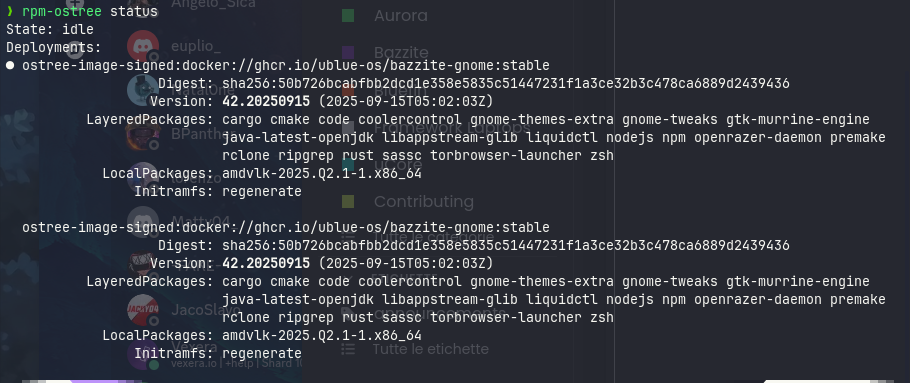

I have no real idea but assume that one of the layered packages might cause problems.
Some general comments:
-
I would recommend to not have so many layered packages. For example,
ripgrepcould easily be installed withbrew. -
I recommend you switch to Bazzite DX. Then I assume you would get
zsh,rcloneand perhaps other stuff automatically as rpm packages. At least I got it when I switched to Aurora DX -
Stuff like npm, nodejs, cargo, rust aso. should be installed in a distrobox. I created a distrobox which I named
devboxHere I have rustup, npm, nodejs aso installed
thank you, the problem was in fact amdvlk, i removed it and now works properly . I didn’t know it existed a dx version of bazzite, they should publicize it more like bluefin.
Very good it is working now.
Switching to DX is a very good step.
Later, when you know exactly which packages you really require as layered packages you may consider to build your own image where you can add those packages. GitHub - ublue-os/image-template: Build your own custom Universal Blue Image! is the starting point.
When building a customized image is all very new stuff to you then you just can wait a bit till you start this part. I am also pretty new to Aurora (started some weeks ago) and today I built an image where I added some packages I really require. If you like to look at it here is the link: GitHub - manfredlotz/aurora-dx-nvidia-open-asus-aso: Add asus and some other software to aurora-dx-nvidia-open
When you decide to switch to DX then it might be good to uninstall all layered software before doing it. After you have switched to DX you may re-install the layered software you need. Execept the stuff you got already from DX.