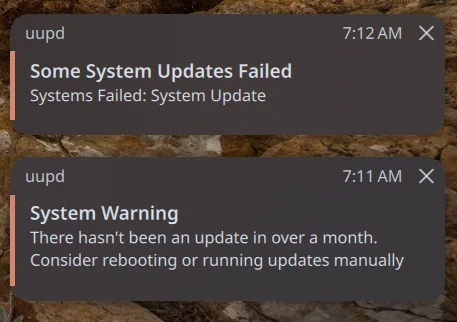
My father in law wants to try Linux, and I’m thinking of recommending Aurora. He is used to automatic updates on Windows. I’m wondering, based on his usage pattern, how this is going to work.
• He’s a laptop user
• He uses his laptop for maybe an hour in the evening, could be 7pm, could be 5pm, who knows?
• He puts his laptop to sleep until the next use.
• He rarely reboots, basically only doing it on Windows 10/11 if there is some sort of notification in the system tray
I can tell him to reboot on occasion; he might remember, who knows? But it doesn’t help if the laptop wasn’t on during the night when a system update is staged. What about other updates with Flatpak?
I’m basically wondering if given his use pattern and the way Aurora does updates, he’d be at risk of almost never getting updates.
Some updates:
I did some tailing of uupd service this morning on a couple of Aurora systems I have (one in a VM for testing) and my laptop which was asleep overnight.
The VM udpated automatically as expected when I booted it up, the laptop took about an hour (didn’t calculate the exact time) before uupd service did its thing. If the 6 hour OnUnitInactiveSectimer setting is missed in uupd’s timer is missed due to sleep, does it pick it up if it misses it? Is that why the laptop waited? Did it know it was close to 5 hours done and picked it up after coming out of sleep?
thanks. Just trying to work out when things get updated due to sleep, hibernate, reboot, etc.
I had a similar issue. Though it was with my parents but they never rebooted their desktop, so I just wrote a script and have it reboot On Saturday nights with automatic login so they don’t notice.
I’d say with your situation, tell him that standby is shutdown now and hide the standby option. That way he just shuts it down every time and that will get it its updates.
I have an Aurora system that I reboot once a week myself. It keeps the flatpaks pretty fresh.
i just set the sleep timer to 2 mins to SLEEP/STANDBY when theres no desktop activity and suspends automatically. i let this run for 2 weeks straight without a issue. i tap the keyboard or move mouse, and, boom, bounces back to life. running on old G1-800 with gtx-1650
also tried on laptop and on lid closure and opening it suspends and wakes with zero issues on OLD foilio laptop. unfortunately i had to install another distro on laptop as the new kernels sends my laptop to melt down mode (over heats)
Use systemd-offline-updates style integration + wake timers, so the system automatically updates and reboots itself silently, even if the user never shuts down.
My work requires me to restart my Windows laptop every Tuesday and Thursday evening at night. To avoid losing any unsaved work, I need to make sure to close all my applications before the reboot takes place. It’s a good habit to remember not to leave anything open, as this can result in lost information. I’m not convinced that restarting computers is a good way of handling security updates.
Maybe debian stable would be better for your father in law. It useally would not need a reboot, unless glibc/kernel(1 - 3 months) update. Updates can install anytime the laptop is awake. That is if you value no suprises and long term stability.
Atomic updates would be better if you want auto reboot or he himself reboots periodically e.g through some reminder or habbit. I think Aurora is the smarter long term choice(automatic, zero maintaince and rollback safe updates)
fair point and twice a week, ooof. But what other alternatives are there when core components can’t be replaced live?
Also is your father in law not working in the cloud? That would make things so much more easy,
OS tells you if the image is one month old. Just tell him to restart when he sees that notification. its literally going to be once a month. 12 restarts a year. I have made a post about this matter on here. ublue needs a good way to request the user does an actual restart. And im not talking about plugin but something that ships with the iso.
The good thing is that the system does download the updates in the background and 15 mins after you restart. So the notification of the month old image is the only thing he actually has to learn.
That’s fine, IF you are good with a user not having a security update for a month. Now granted in many situations the type of vulnerability is probably not going to be a problem. My experience has been for most desktop users, if there is going to be one that needs to be addressed NOW, it’s going to be browser or something related to a file type they open every day (.doc or .docx file they get in email or something).
I think more people would step up if they knew how or what the best way would be to develop this and how it would work. There should be some kind of technical discussion about how difficult it would be to implement. I know there’s the GitHub repository, but should that request and discussion happen at the uBlue core level, or at the Aurora and Bluefin level, etc.?
I’m not afraid of getting my hands dirty and rolling up my sleeves, but I’m not a developer….though as my friend says “You are only 1 pdf or yourube video away from being an expert”
I’m sorry but this reply is plain embarrassing. So by your logic if something does not get addressed/developed it means that its not needed? A feature can be good for the user but there is literally no manpower available for it to get developed. That does not mean that it needs to be addressed as sour grapes. The answer can literally be “Sounds good but we have much more important targets to hit right now”
Out of all the Maintainers/Developers on this board you are by far the most hostile. People can ask for things that does not mean they need to get a ironic response back. I love the uBlue project in general and I keep recommending it to people around me. I have moved over 20 of my friends PCs to this project. So when I ask for this feature its because I have already received the question “why doesnt my system tell me to restart and not sleep” more than once!
One of the main features of this projects are the batteries. I asked for a freaking DOT on the power button so I can tell them “when this dot is there just shutdown/restart instead of sleep”. I didn’t ask for a multi year development project! If none wants to give his time to develop it that’s fine. As I said already I dont know coding I just love uBlue ,by your logic if I dont have the skills to develop I should not have a freaking opinion here at all.
Man…there are FAR better ways to say what you want than that paragraph of heat.
Instead of THAT, why don’t you head over to the github repo and put in a request? Thats the proper place for it. I haven’t checked, but there may already be one open and a discussion about the merits technical and otherwise regarding it.
I know VIBE coding annoys a LOT of people, crap code is produced especially for something complicated. Simple scripts though, it can save some time. I might give this a try and debug it by hand. Who knows, maybe this is all that is needed. I have no idea if this will actually work or just break but who knows
Hmm. It just occurred to me after asking the AI, we ALREADY do have a reboot notification, it appears in the shell when you boot up after a new update is staged. That script the AI pumped out could probably be WAY simpler by just leveraging the code that already does that (IDK, probably shell code instead of python)
I’ll dig a little to see how it works, but offhand, how easy do you think it would be to leverage the “new staged” notification/code that we see in the terminal to automatically run somewhere (systemd timer, crontab, etc.) every 30 minutes or so and trigger a dismissible popup?
Basically it just runs a command which you can see here:
You can propably cook up a systemd-service with a help of “good” coding AI pretty easily and hook that up to native notify system (i think we have notify-send or something)
hmm. I forgot about notify-send. That could work. I’ll cook something up and give it a try. If it works I’ll share it here or something, or maybe in the github open issue I found. thanks!