No, I could not get it to work.
The Homebrew cask installs a script that works around the flatpak Firefox not being able to invoke the browser helper, by wrapping it with flatpak-spawn --host.
#!/bin/bash
if [ "${container-}" = flatpak ]; then
  flatpak-spawn --host /home/linuxbrew/.linuxbrew/bin/1Password-BrowserSupport "$@"
else
  exec /home/linuxbrew/.linuxbrew/bin/1Password-BrowserSupport "$@"
fi
I don’t know enough to say why, but when the browser plugin tries to call that script, it logs an error and aborts.
WARN  2025-10-19T20:07:10.723+00:00 main(ThreadId(1)) [1P:foundation/op-startup/src/linux.rs:20] Yama is absent or ptrace_scope is set to 0.
INFO  2025-10-19T20:07:10.725+00:00 main(ThreadId(1)) [1P:native-messaging/op-browser-support/src/main.rs:269] Starting 1Password-BrowserSupport 8.11.14 production build no. 81114024.
ERROR 2025-10-19T20:07:10.725+00:00 main(ThreadId(1)) [1P:foundation/op-binary-support/src/linux.rs:99] process detected it was running without libc's security, aborting
The logs are at ~/.config/1Password/logs/BrowserSupport for those interested. I don’t know enough to understand what it means by “running without libc’s security”.
If I modify that helper script to run the rpm-ostree-installed /opt/1Password/1Password-BrowserHelper instead of the Homebrew binary and make no other changes, it immediately works without needing a browser restart;
WARN  2025-10-19T20:08:07.913+00:00 main(ThreadId(1)) [1P:foundation/op-startup/src/linux.rs:20] Yama is absent or ptrace_scope is set to 0.
INFO  2025-10-19T20:08:07.914+00:00 main(ThreadId(1)) [1P:native-messaging/op-browser-support/src/main.rs:269] Starting 1Password-BrowserSupport 8.11.14 production build no. 81114024.
INFO  2025-10-19T20:08:07.914+00:00 main(ThreadId(1)) [1P:native-messaging/op-browser-support/src/browser_verification/linux.rs:44] Verifying browser "/usr/libexec/flatpak-session-helper"
INFO  2025-10-19T20:08:07.924+00:00 main(ThreadId(1)) [1P:native-messaging/op-browser-support/src/browser_verification/linux.rs:58] Browser "/usr/libexec/flatpak-session-helper" verified successfully
INFO  2025-10-19T20:08:07.924+00:00 main(ThreadId(1)) [1P:native-messaging/op-browser-support-lib/src/communication_logic.rs:153] Starting SLS communication (attempting connection to desktop app)
INFO  2025-10-19T20:08:07.925+00:00 main(ThreadId(1)) [1P:native-messaging/op-browser-support-lib/src/communication_logic.rs:215] Connected to the desktop app
So there’s something that differs between the two binaries. For all I know it may even be the path. What I do see is that the 1Password-BrowserHelper from rpm-ostree is setgid.
$ stat /home/linuxbrew/.linuxbrew/Caskroom/1password-gui-linux-zor/8.11.14/1password-8.11.14.x64/1Password-BrowserSupport
  File: /home/linuxbrew/.linuxbrew/Caskroom/1password-gui-linux-zor/8.11.14/1password-8.11.14.x64/1Password-BrowserSupport
  Size: 57595656        Blocks: 112496     IO Block: 4096   regular file
Device: 0,55    Inode: 2267724     Links: 1
Access: (0755/-rwxr-xr-x)  Uid: ( 1000/  zorael)   Gid: ( 1000/  zorael)
Context: unconfined_u:object_r:user_home_t:s0
Access: 2025-10-19 22:06:37.159913089 +0200
Modify: 2025-10-10 16:42:31.000000000 +0200
Change: 2025-10-19 22:02:37.406107478 +0200
 Birth: 2025-10-19 22:02:37.375391761 +0200

$ stat /opt/1Password/1Password-BrowserSupport
  File: /opt/1Password/1Password-BrowserSupport
  Size: 57595656        Blocks: 112496     IO Block: 4096   regular file
Device: 0,40    Inode: 147803      Links: 1
Access: (2755/-rwxr-sr-x)  Uid: (    0/    root)   Gid: ( 1002/onepassword)
Context: system_u:object_r:usr_t:s0
Access: 1970-01-01 01:00:00.000000000 +0100
Modify: 1970-01-01 01:00:00.000000000 +0100
Change: 1970-01-01 01:00:00.000000000 +0100
 Birth: -
But even if I copy the /opt/1Password binary into the Homebrew installation with sudo cp -a to preserve the setgid, I still get errors and it still doesn’t work.
WARN  2025-10-19T20:39:18.120+00:00 main(ThreadId(1)) [1P:foundation/op-startup/src/linux.rs:20] Yama is absent or ptrace_scope is set to 0.
INFO  2025-10-19T20:39:18.121+00:00 main(ThreadId(1)) [1P:native-messaging/op-browser-support/src/main.rs:269] Starting 1Password-BrowserSupport 8.11.14 production build no. 81114024.
INFO  2025-10-19T20:39:18.121+00:00 main(ThreadId(1)) [1P:native-messaging/op-browser-support/src/browser_verification/linux.rs:44] Verifying browser "/usr/libexec/flatpak-session-helper"
WARN  2025-10-19T20:39:18.128+00:00 main(ThreadId(1)) [1P:foundation/op-sys-info/src/process_information/linux.rs:331] binary permission verification failed for /var/home/linuxbrew/.linuxbrew/Caskroom/1password-gui-linux-zor/8.11.14/1password-8.11.14.x64
ERROR 2025-10-19T20:39:18.164+00:00 main(ThreadId(1)) [1P:native-messaging/op-browser-support/src/main.rs:302] Browser support error: BrowserProcessVerification(BinaryPermissions), happened in: native-messaging/op-browser-support/src/browser_verification/linux.rs:53
        Additional error context: Failed to verify browser permissions
I cannot say whether the browser helper in /opt/1Password can speak to the Homebrew installation of the GUI, as starting the GUI via Homebrew seems to make it fall back to /opt/1Password/1Password instead if it’s available.
So there’s something that’s different between /opt/1Password/1Password-BrowserSupport and /home/linuxbrew/.linuxbrew/Caskroom/1password-gui-linux-zor/8.11.14/1password-8.11.14.x64 that makes 1Password abort trying to invoke the latter with “process detected it was running without libc’s security”.
It is possible it may behave slightly differently if there is no installation via rpm-ostree.
If you want to test this, the way to see if it works is to run both the GUI and the browser with the extension added, then right-click the extension icon on the toolbar and pick Settings. The very first General screen will say whether or not the two successfully connected to each other. If they didn’t, there are the logs.
$ brew install --cask zorael/tap/1password-gui-linux-zor
$ brew install --cask zorael/tap/1password-flatpak-browser-integration-zor
(I think those are the commands but I am really new to Homebrew, so maybe not. Here are the casks.)
The wrapper script is at ~/.var/app/org.mozilla.firefox/data/bin/1password-wrapper.sh, and again, logs are at ~/.config/1Password/logs/BrowserSupport.
 ” message in the extension’s settings.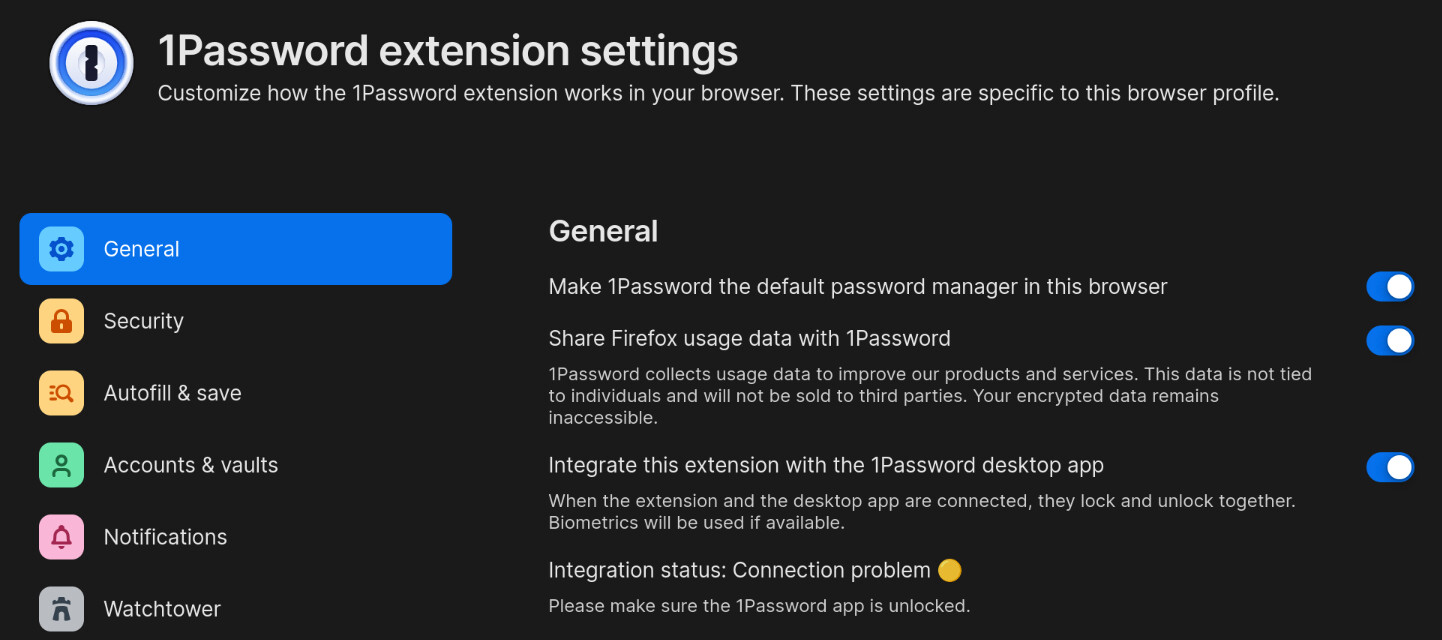

 ” in its settings?