Hi guys, I’m pretty new to Linux and Bazzite so please excuse any stupid questions.
I recently got the GPD Win 5 with the hopes of using it as a living room PS5 replacement. So far my handheld experience has been fantastic with Bazzite but i’m really struggling to get it to play nicely in docked mode / via HDMI.
When hooked up to my TV / Via my Denon Receiver it uses the
Radeon HD controller.
├─ Devices:
│ 54. Radeon High Definition Audio Controller [Rembrandt/Strix] [alsa]
│ 77. Family 17h/19h/1ah HD Audio Controller [alsa]
│ 101. Lenovo 50 Monitor Camera [alsa]
i’m currently plugged into my PC screen so not sure this next bit is relevant.
Settings
└─ Default Configured Devices:
0. Audio/Sink alsa_output.pci-0000_64_00.1.HiFi__HDMI4__sink
My main issue is the audio. I am unable to get steam to stay in 5.1 / 7.1 mode. As soon as I leave the settings/Audio screen it reverts to stereo. I have tried various tools / settings in desktop mode but the audio settings seem really basic on the gnome desktop, there is no option to select stereo / Surround that I can see.
Am I missing any drop downs or advanced settings here? Clicking test only shows L/R channels regardless of what is plugged in.
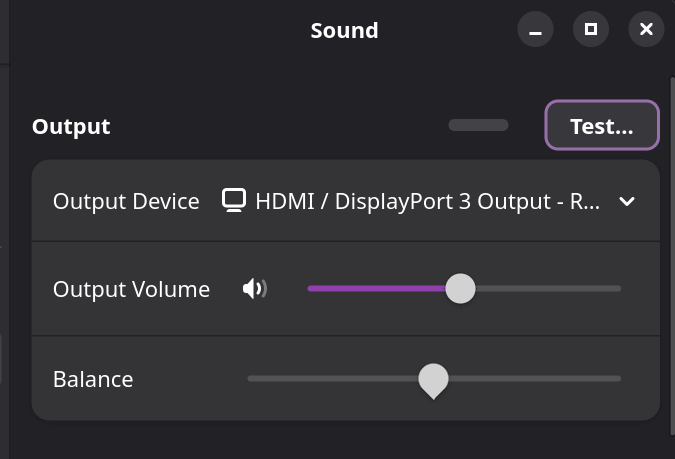
I have also tried various tools / Volume Control etc. With no luck.
Also once I launch Desktop mode and go back to steam the audio options to select surround sound in steam vanish, so I have to reboot to get these back (not that they work anyway).
Any help / Guidance would be appreciated.
System info
System Details Report
Report details
- Date generated: 2025-12-22 18:29:15
Hardware Information:
- Hardware Model: GPD G1618-05
- Memory: 32.0 GiB
- Processor: AMD RYZEN AI MAX+ 395 w/ Radeon™ 8060S × 32
- Graphics: Radeon™ 8060S Graphics
- Disk Capacity: 2.0 TB
Software Information:
- Firmware Version: 2.23
- OS Name: Bazzite
- OS Build: (null)
- OS Type: 64-bit
- GNOME Version: 49
- Windowing System: Wayland
- Kernel Version: Linux 6.17.7-ba20.fc43.x86_64