As the title says, my idle RAM usage is strangely high, almost half total. It’s currently 28.8 / 62 GiB. Playing a game and watching youtube at the same time has crashed my PC a few times, and I think it was because of RAM running out. This wasn’t happening on Kinoite with the same hardware.
My System Monitor is not showing enough running applications that add up to that amount of RAM. At worst it’s about 8 GiB right now by adding up the totals, so I’m a bit confused where the extra ~20 GiB is going to. Does anyone know how to fix this? I added 16 GiB of Zswap already just to help alleviate things a little.
I had to reboot my PC, so I played a Steam game and then closed it and Steam before I reached max RAM usage to recreate the issue. On the monitor widget, RAM decreased from near max to about 40GiB.
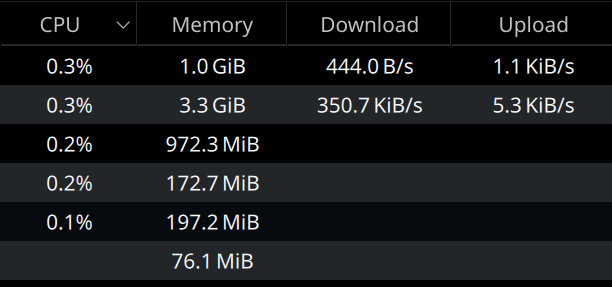
Here is the output of my free -t -h and a snapshot from the “Applications” tab on System Monitor taken a brief moment apart. As you can see, the amount of ram being actively used by the programs shouldn’t be adding up to 40GiB.
               total        used        free      shared  buff/cache   available

Mem:            61Gi        40Gi        15Gi       154Mi       8.2Gi        20Gi
Swap:           15Gi       233Mi        15Gi
Total:          77Gi        41Gi        31Gi
Right, It’s good there, but I think if I had continued gaming it would have slowly reached max and froze everything like before. The 40GiB is after closing Steam.
It’s like unnecessary memory isn’t being cleared or something.
If this isn’t happening for most people, I wonder if this could be an issue caused by rebasing from Kinoite somehow.
An OS is supposed to make sure as much of your RAM is being leveraged all the time. And make sure that if suddenly much more is needed, it empties stalled/sleeping stuff.
If you would have only 20G in use while you are actually doing tasks on your system and have 64GB, I’d say that’s an issue, because it means you are missing out on the benefits of having as much as possible in your RAM.
In general case yes… and it would be reflected in buff/cache usage… but this is not the case here. OS is not using extra free RAM for caching. Something else is eating up the RAM.
@Stone do a df -h and check if there is any tmpfs that has blown up. Things like logs could pile up there and silently eat up the RAM.
Do you have a dedicated GPU? Because with CPU-provided iGPU, your RAM will get used for VRAM. As you said the issue/RAM usage increases with the complexity of graphical processes, this sounds like the most logical explanation to me.
If you have a dedicated GPU, maybe it’s not working/ addressed correctly?